Complete Guide to App Publishing — Why Google & Apple Releases Are Hard, and How AppBuildChat Handles Everything for You
Once you provide the required info, AppBuildChat handles everything — account setup, build upload, review response, feature fixes, and resubmission until approval.
Posted by: Bart Anderson
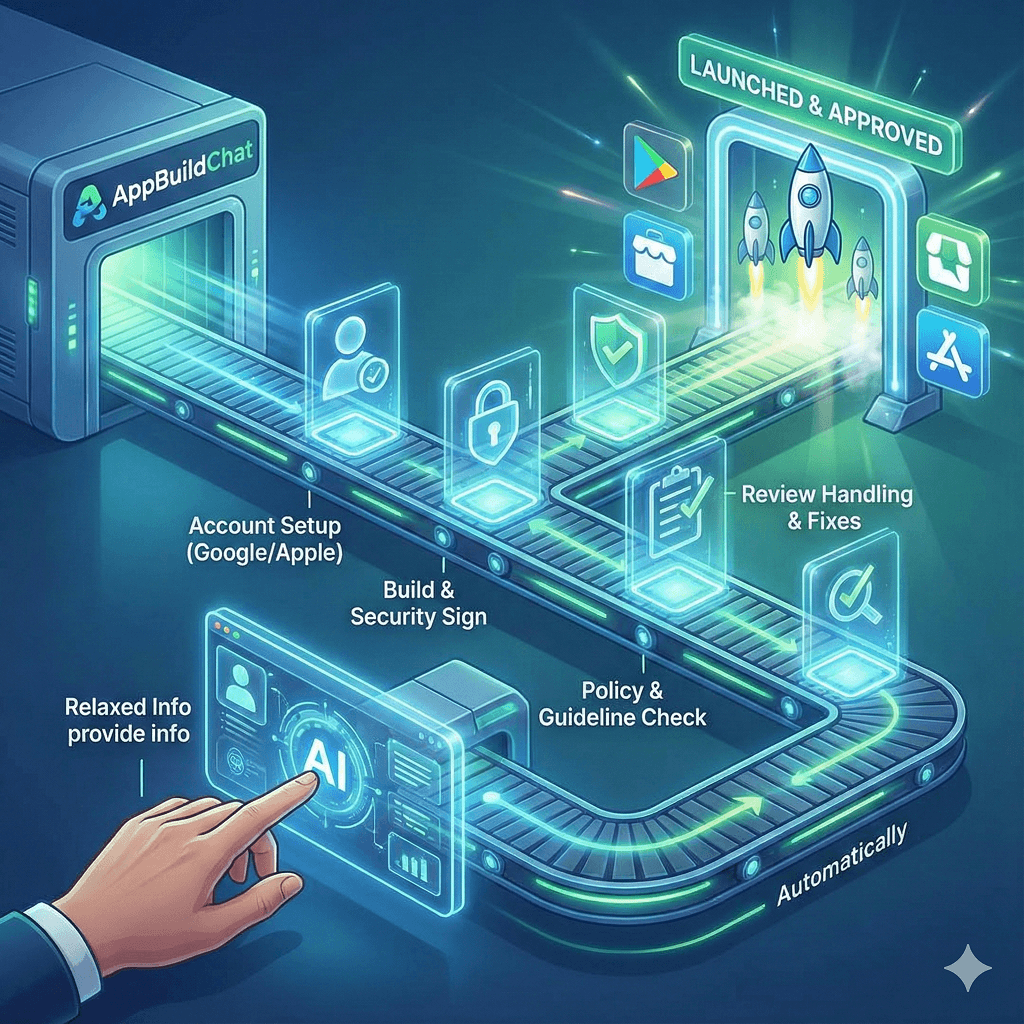
Anyone can publish to Google Play or the Apple App Store — so why is it so difficult to finish?
While anyone can try to publish an app, actually completing the process requires far more preparation than most founders expect.
It is not just “uploading an app file.” It involves account configuration, security verification, build settings, policy compliance, screenshot preparation, and review handling — all of which require detailed technical work.
Apple in particular is extremely strict about UI layout, security, permissions, and login flow. Google applies rigorous checks around privacy, data handling, and content policies. Since early founders rarely understand these rules upfront, they experience repeated rejections and avoidable errors.
You can start easily — but you cannot finish easily. That is the real challenge.
What makes Google/Apple publishing so complex? (Actual required steps)
The process is not “difficult” as much as it is long, interconnected, and sensitive to errors.
If even one piece is wrong, you cannot proceed.
- Developer account setup — where many founders lose days:
- Submit personal/business information
- Enter tax information
- Link bank accounts
- Accept policies
- Email verification
- Join Apple Developer Program (₩129,000/year)
If this stage is not completed correctly, you cannot upload builds at all.
- Store listing configuration (must follow strict policy formats)
Writing store content is not simple text entry — it must meet guidelines:
- App name & subtitle
- Policy-compliant description
- Privacy handling statements
- Icon (exact required resolutions)
- Device-specific screenshots (Apple requires at least 5 per device type, strict resolutions)
- Optional promo video
- Build upload & security certification — one of the hardest parts:
- Apple: Upload via Xcode or Transporter
- Google: Upload Android App Bundle (.aab)
- Set correct permissions (camera, notifications, location)
- Security signing (keystore creation & maintenance)
- Provisioning profiles & certificates (Apple’s extremely difficult requirement)
This stage creates frequent errors — and early founders often cannot understand the messages they receive.
- Policy review & guideline compliance
Apple is especially strict. A single issue can cause rejection:
- Login flow issues
- Missing account deletion
- UI/UX guideline violations
- Incorrect policy wording
- Misaligned data collection practices
- Inappropriate content
Google also performs detailed checks on privacy, permissions, and data safety.
- Review stage (where real devices are used)
Reviewers test the app themselves and often report issues like:
- “This feature does not work on this screen.”
- “The policy description is insufficient.”
- “Please modify this flow to match guidelines.”
- “Your login process needs changes.”
If rejected, you must fix the app and resubmit — sometimes repeatedly.
Where do early founders struggle the most?
Most founders face major roadblocks in three areas:
- Build upload technical errors
Security, signing, and permission issues frequently prevent builds from uploading. - Policy compliance failures
Apple rejects apps for surprisingly small issues — button labels, UI placement, login flow mistakes, etc. - Reviewer requests
Review feedback often requires:- Functional logic changes
- UX flow updates
- Server communication fixes
These are not simple text edits — they require actual app modifications, which non-technical founders cannot do.
This leads to weeks or months of delays.
How does AppBuildChat solve these problems?
AppBuildChat treats publishing as a service we perform for the customer, not something the customer must do.
Your only responsibility is: Provide basic info (app name, icon, description, etc.).
AppBuildChat handles everything else:
- Developer account setup guidance
- Build generation and upload
- Security signing & provisioning setup
- Store guideline checks
- Automatic screenshot preparation
- App review submission
- Responding to reviewer requests
- Modifying features or code when needed
- Resubmitting the app
- Managing the process until approval
You never need to touch the developer console, troubleshoot errors, or interpret reviewer feedback.
So what changes when you publish through AppBuildChat?
App creation and app publishing are completely different domains. Creation is a creative process.
Publishing is a technical, policy-driven, verification-heavy process.
Because AppBuildChat handles the entire publishing pipeline, you:
- Don’t waste time on confusing technical steps
- Don’t get stuck on build errors
- Don’t panic at reviewer feedback
- Don’t handle policy compliance alone
- Don’t worry about resubmission
AppBuildChat continually works on your behalf until the app is approved.
Your job becomes incredibly simple:
Just say: “Please publish my app.”
From that moment on, AppBuildChat takes responsibility for the entire journey to final approval.