Launch Preparation
The Launch Preparation tab walks you step by step through everything needed to submit your app to the App Store and Play Store. Follow the checklist to make sure nothing is missed before launch.
Progress Checklist
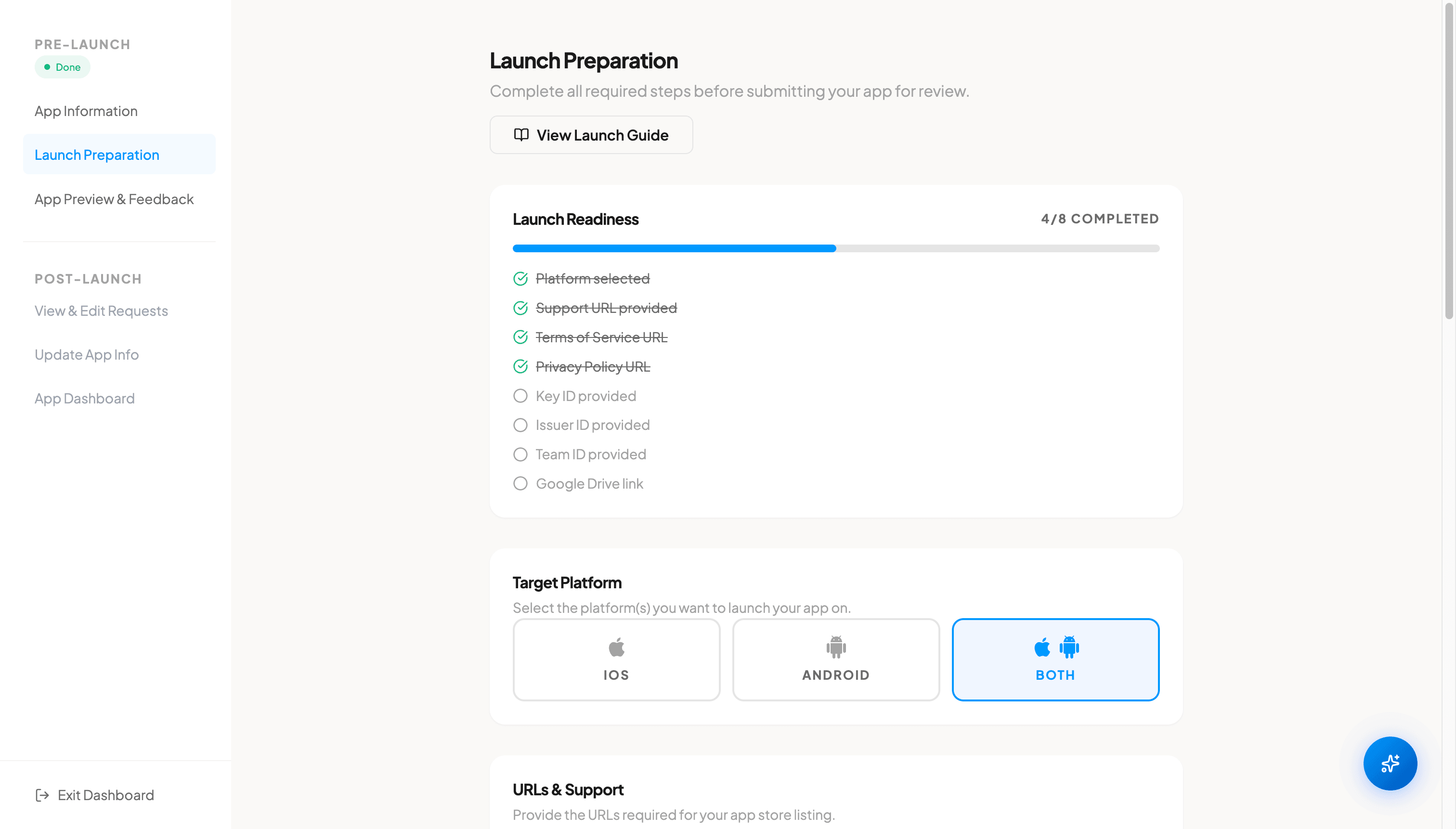
The launch preparation checklist tracks your progress across all required steps. Each item updates automatically as you complete it, giving you a clear picture of what is done and what remains before your app can be submitted.
Platform Selection
Choose your target platform, either iOS, Android, or Both. This determines which store-specific requirements you need to complete. Selecting "Both" ensures your app is prepared for release on both the Apple App Store and Google Play Store.
Required URLs
Both Apple and Google require a few URLs before your app can be submitted for review. Enter each of the following.
- Support URL. A page where users can get help or contact you (for example, your FAQ or contact page).
- Website URL (optional). Your app's website or your company homepage.
- Terms of Service URL. A page with your terms and conditions for using the app.
- Privacy Policy URL. A page explaining how your app collects and uses user data.
Make sure all URLs are publicly accessible. The stores will verify that each link works before approving your app.
iOS Certificate
For iOS deployment, you need to provide the following credentials from your Apple Developer account.
- Key ID. The identifier for your App Store Connect API key, used to authenticate build uploads.
- Issuer ID. Your organization's unique ID in App Store Connect, found on the API Keys page.
- Team ID. Your Apple Developer team identifier, found in your developer account membership details.
- Certificate File (Google Drive link). Upload your signing certificate (.p8 file) to Google Drive and paste the shared link here. We need this file to sign the app on your behalf for App Store submission.
If you are unsure how to find or generate these, open the Launch Guide for step-by-step instructions.
Launch Guide
The Launch Guide modal provides step-by-step instructions for preparing your app for release. It includes separate guides for iOS and Android, with links to official documentation. Use this guide if you need help setting up your Apple Developer account, obtaining certificates, or configuring your Google Play Console.
App Store Review & Rejections
After your app is submitted, Apple and Google review it before it goes live. This review process can take up to 7 business days. If your app is rejected during review, our team handles most rejection issues on your behalf. We will identify the problem, make the necessary fixes, and resubmit. You will be notified of the status throughout the process.
FAQ
Do I need both an Apple Developer and Google Play account?
Only if you are launching on both platforms. If you selected iOS only, you need an Apple Developer account ($99/year). If you selected Android only, you need a Google Play Developer account ($25 one-time fee). For both platforms, you need both accounts.
Where do I get my iOS certificate credentials?
You can obtain your Key ID, Issuer ID, and Team ID from your Apple Developer account at developer.apple.com. The Launch Guide in the dashboard provides step-by-step instructions for finding and generating these credentials.
Do I need a Privacy Policy and Terms of Service?
Yes. Both Apple and Google require a Privacy Policy URL for all apps. Terms of Service are also required for apps that offer subscriptions, in-app purchases, or handle user data. These must be hosted on a publicly accessible URL.
How long does the app review process take?
The app review process can take up to 7 business days for both the Apple App Store and Google Play Store. Review times vary depending on the complexity of your app and current review queue volumes. If your app is rejected during review, our team handles most rejection issues and resubmits on your behalf.